


II) Configuring the Car sheet
Go to the Cars screen (accessible by pressing the Cars icon -the 4th, in the middle-right-).
The list of registered cars is displayed on the screen. It contains a default car on first use (Aston Martin DBS).
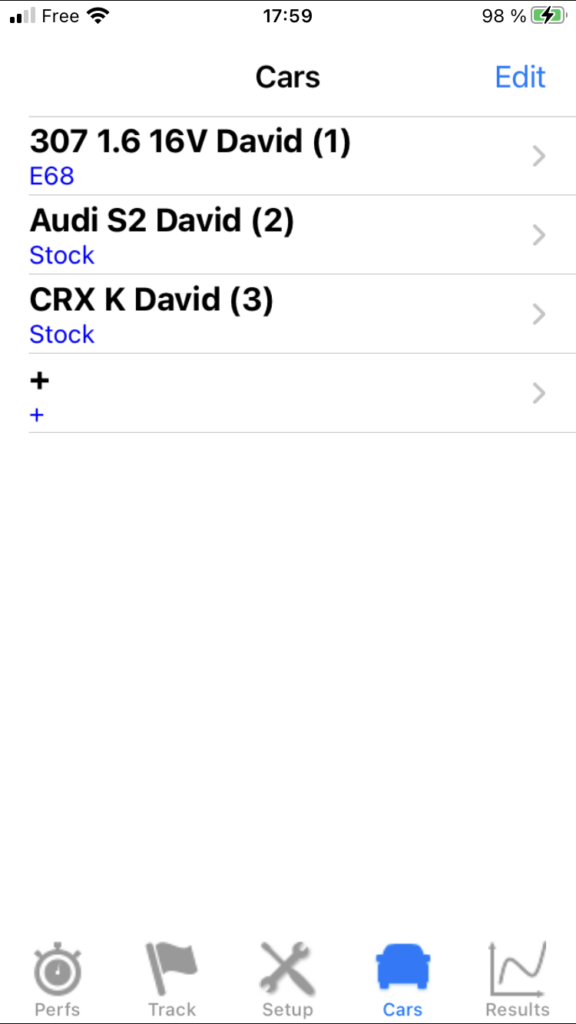
1) Create & Modify a car
Click on the row corresponding to the desired car, or on the + row if you want to create a new car. You then access its sheet, which you will have to fill in completely. Once completed, you can return to the Cars screen by pressing the BACK button.
Note: Although it is not essential, remember to close the keyboard after entering the information by pressing the blue button Done, because this action generates a process of checking the validity of the information entered which can help you correct any data that may be erroneous!
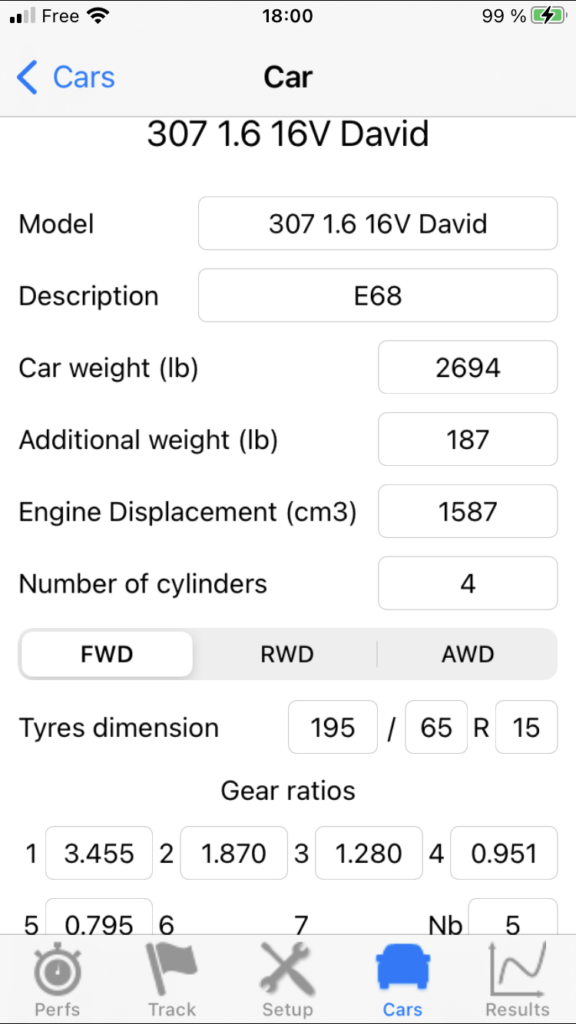
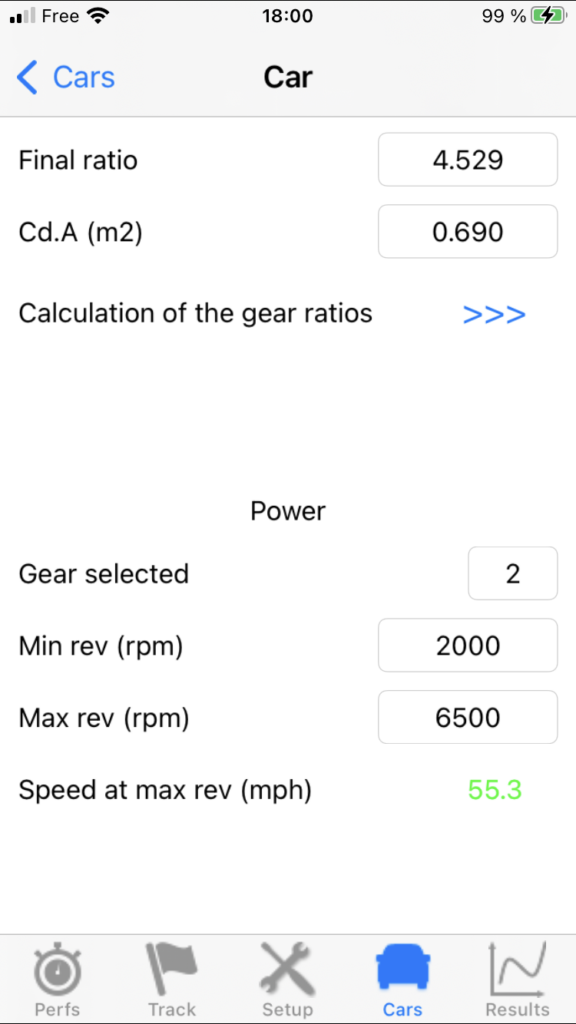
2) Structure of a Car sheet
A) Basic data (8)
You must enter 8 basic data, necessary for power measurements:
- Car weight
- Engine displacement
- Number of cylinders
- Transmission
- Tyres dimension
- Gear ratios
- Final ratio
- Cd.A
Plus a 9th: the additional weight, which corresponds to all the masses other than those of the car: yours of course (or that of all the occupants present in the car at the time of the power measurements if you are several), and that of eventual luggages, belongings, or tools.
All the information necessary to enter these 8 basic data is given in the Database section, which will also provide you with a link to:
– The PerfectPower Database
– The most complete automotive database in the world: The Automobile-Catalog
IMPORTANT: The link to the Database section is also available in the application, in the Car sheet, at the bottom in the “Help completing the Car sheet” chapter.
B) Option: Calculation of the gear ratios
If you don’t know the gear and final ratios of your car (car present neither in the PerfectPower database nor in that of the Automobile-Catalog), or you want to check them, PerfectPower has an option called “Calculation of the gear ratios” specially created for this purpose! This option is at the bottom of the Car sheet, and it is accessible by pressing the blue button >>>.
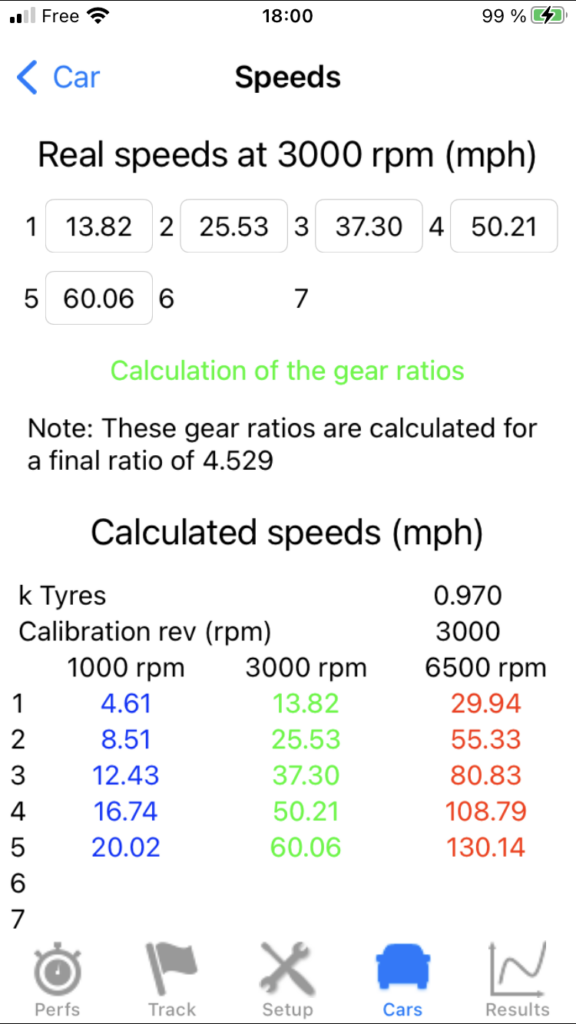
To use it, you just need to measure the stabilized speeds on each gear at 3000 rpm with PerfectPower (GPS speed permanently displayed at the top of the Perfs screen), then enter them in the corresponding fields in this option (remember to close the small keyboard after typing), and finally press the “Calculation of the gear ratios” button located just below the fields: PerfectPower will then calculate your new gear ratios, and put them in the corresponding fields “Gear ratios” in the Car sheet!
A few remarks however:
- This calculation of the gear ratios is necessarily done for a given final ratio: it is the one that is entered in the “Final ratio” field when you access the option. Of course, it’s possible that this isn’t the right final ratio since if you use this option, it is probably because you know neither the gear ratios nor the final ratio of your car, but it does not pose any problem, and you can just as well leave the default value of 3.705 (Aston Martin DBS), or put another one of your choice (4 for example), and all the gear ratios will be calculated for this final ratio. Admittedly, these gear ratios will therefore not be the real ones but equivalent ratios calculated for the final ratio entered, which is therefore not the correct one either, but as said this does not pose any problem, because what counts to calculate the engine speed / wheels speed ratio is only the total ratio (= gear ratio * final ratio), and this total ratio will be perfectly good for all gears! Of course, if you know the real final ratio, fill it in and then PerfectPower will calculate your real gear ratios.
- It is not essential to take this reading for all the gears: the most important is to do it for the gear used for the power measurements, generally the 2nd. All you have to do then is leave all the other fields at their default values. Nevertheless, PerfectPower encourages you to do it for all gears, so that the performance simulator can work properly, if you use it of course.
- This option also works in the opposite direction, to allow you to check if the gear and final ratios that you have entered in the Car sheet are correct: indeed, when you access this option, PerfectPower calculates the real speeds at 3000 rpm on all gears and displays them in the corresponding fields of this option: you just need to compare these speeds with those you measured on the road by stabilizing at 3000 rpm on each gear: they must be equal at +- 1 km/h & mph!
C) Measurement data (3)
You must enter 3 measurement data, defining the conditions of your power measurements:
- Gear selected
- Min rev
- Max rev
The power measurements must always be carried out on a single gear, from a minimum rev to a maximum rev, both allowing to cover the entire normal engine operating range, so you must obviously specify these 3 parameters to PerfectPower!
- Gear selected: Use only the 2nd or the 3rd with a serial car, knowing that what determines this parameter in priority is the measurement time, which must be ideally between 5 and 10 s. Which to schematize corresponds to the 2nd for cars under 300 hp, and the 3rd for the (rare!) others.
- Min rev: Use 2000 rpm in gasoline engine and 1500 rpm in Diesel engine, values typically used on chassis dynamometers and perfectly suited to these types of engines
- Max rev: Use the rev limiter in gasoline engine and the red zone in Diesel engine
Note 1: In some rare cases, you may be required to measure in a gear higher than 3rd:
- Measurement duration below 5 s even in 3rd (but then you have a real rocket!)
- Insufficient grip even in 3rd (same remark!) (of course, it is preferable to avoid measuring in the rain…)
On the other hand and except in very special cases (like an ultra long 1st…), you should NEVER be required to measure in 1st!
Note 2: It is frequent that there is a voluntary limitation of the torque on the first two gears on FWD sports cars (and not even really in fact: a Peugeot 2008 1.2 turbo 130 hp falls into this scenario!), also in this scenario and even if the measurement duration is between 5 and 10 s in 2nd, do not hesitate to test in 3rd to see what it gives…
Note 3: PerfectPower calculates the theoretical max speed on your measurement gear (theoretical speed on the gear selected at the max selected), and displays it in green just below the 3 fields of the 3 measurement data (line “Speed at max rev”). This value is a precious help, as it will allow you to check at a glance during your power measurements if everything is OK (setting of the gear and final ratios and of the tyres dimension, quality of the GPS reception on your measurement road): indeed, the max speed actually measured by PerfectPower must match this theoretical max speed! Please note, however, that a tolerance margin of +- 2% must be granted to this value, corresponding to that on the actual tyres dimension (that on the gear and final ratios is negligible).
3) Delete a car
You can delete a car at any time: from the Cars screen, press the Edit button located at the top right: you will then see a red button appear to the left of each car. Press the one corresponding to the car to be deleted, a red button Delete then appears to the right of the car, and you must press it to permanently delete the car. You can then delete other cars by repeating the same operation. Do not forget at the end to press the Done button located at the top right to tell the application that you have finished your deletions.
Warning: This deletion operation is irreversible, and it deletes at the same time all the results associated with this car!