


Quick guide
Using PerfectPower properly comes down to following a 4-point typical approach:
- 1) Properly configure the application (chapter I)
- 2) Properly configure the Car sheet (chapter II)
- 3) Properly mount the phone in the car (chapter III)
- 4) Properly measure, using the flattest and smoothest possible measurement road, and averaging TWO measurements performed in BOTH directions of the road (chapter IV)
And that’s ALL! Of course, you need to know and understand the content of each of these points, and you have two ways to do it:
- The (a little) long method: Read each of the 4 dedicated chapters given in link above!
- The short (and fun) method: Watch the tutorial and the demonstration videos in Videos section!
Once your measurements performed,, you can learn how to:
- Use the Performance Simulator (chapter V)
- Use the Lap Timer (chapter VI)
- Manage your results (chapter VII)
That being said, you need also to take note of the following two points:
- Usage recommendations when opening the application for the first time (annex 1)
- The possibility offered to you of using an external GPS (RaceBox Mini, SkyPro XGPS 160, …), and their instructions for use (annex 2)
And finally, you need also to take note of the basic structure of the application defined by a schema of 5 basic screens, which is presented to you below!
Definition of the 5 basic screens
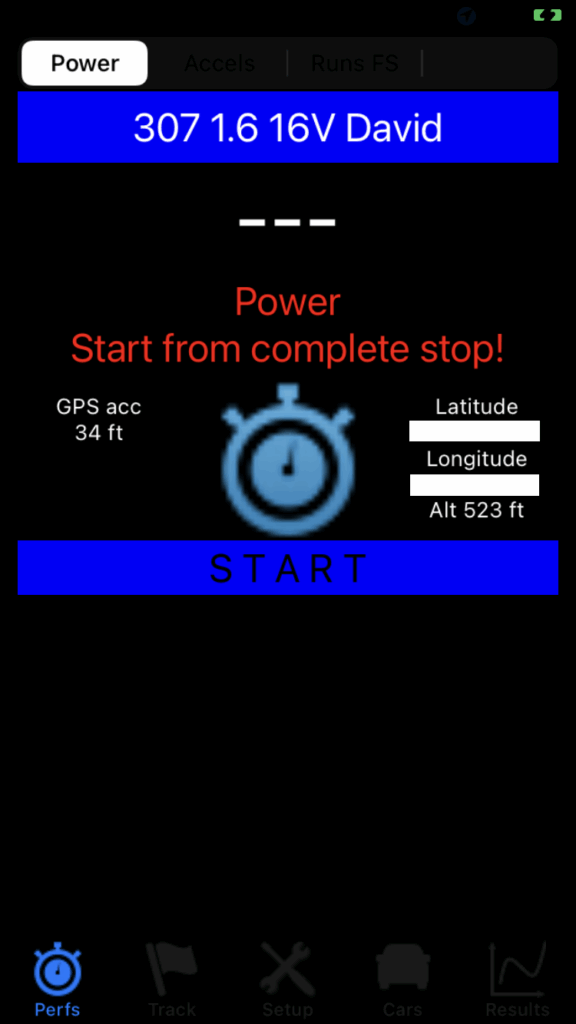
PerfectPower has 5 basic screens, which you can access from the home screen via the menu bar located at the bottom of the screen, which has 5 icons. These screens are, from left to right:
- 1) Perfs screen = Home screen: You’re already there! Symbolized by the Perfs icon (the 1st, on the left)
- 2) Track screen: Accessible by pressing the Track icon (the 2nd, in the middle-left)
- 3) Setup screen: Accessible by pressing the Setup icon (the 3rd, in the middle)
- 4) Cars screen: Accessible by pressing the Cars icon (the 4th, in the middle-right)
- 5) Results screen: Accessible by pressing the Results icon (the 5th, on the right)
Temporary particularity of PerfectPower iOS as of Monday, January 26, 2026
The iOS version is currently less complete than the Android version (this is why it is cheaper), and this delay will be made up by April 2026 according to this PLAN.
However, for the sake of consistency, the guide of the iOS version has been built based on that of the Android version making reference and it has been adapted to the less complete iOS version, which means that certain chapters have been temporarily emptied and will only be re-filled when the iOS version has the functionalities corresponding to the chapters concerned, so that the guide is always perfectly “synchronized” with the current version.